
Nodus Draw: Undo and history
Ctrl+Z undoes the last change and Ctrl+Shift+Z (or Ctrl+Y) redoes it. The Edit menu says what each would undo or redo: "Undo Move", "Redo Rotate".
Nothing is ever lost
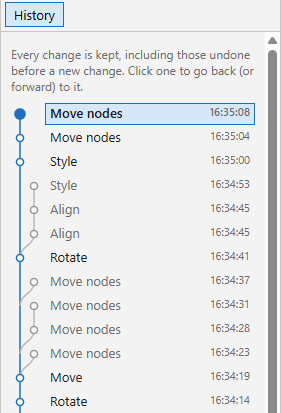
In most programs, undoing a few steps and then changing something loses the steps undone. In Nodus Draw it does not: the steps you undid are kept, on a branch of their own, and you can always go back to them.
Edit › Undo History opens the History docker. It lists every change, newest first, with its time, on a graph like a family tree: each time you undid and then went a different way, the new way starts a branch beside the old one. The state you are at is marked, and changes undone are grey.
Click any row to go back (or forward) to that state, on any branch, with the objects that were selected then. Undo and redo then carry on along that branch.
A drag (moving, resizing, drawing) is one change, however long it takes; typing a text is one change when you finish it.
History of saved drawings
When you save a drawing, the browser keeps its whole undo history too. Open the same file again later, even days later after closing Nodus Draw, and the History docker shows every change as before, at the state that was saved: undo takes you back through the changes made before it was saved, and redo forward through any made after it and undone. The status bar says when a history has come back.
- Nothing is added to the file: the history is kept in this browser (or the installed application) only.
- It comes back only for the file exactly as Nodus Draw saved it. A file changed since, in another program, opens with a new history.
- Histories are kept for 90 days after the drawing was last saved or opened, for up to 50 drawings.
So a drawing changed and then undone back to how it was saved can be closed without saving: open it again and redo brings the changes back.
Unsaved drawings kept in case of a crash keep their undo history too (see Files).
This website is free and ad-free, but costs me money to run. If you'd like to support this site, please consider making a small donation or sending me a message to let me know what you liked or found useful.